Features

Everything your service business runs on, in one system

Bookings, teams and resources, pricing, customers, payments and reports, connected through the same booking, customer and payment records. Explore the tools available for your service business.

Start free trial
14-day free trialNo card requiredGuided setup
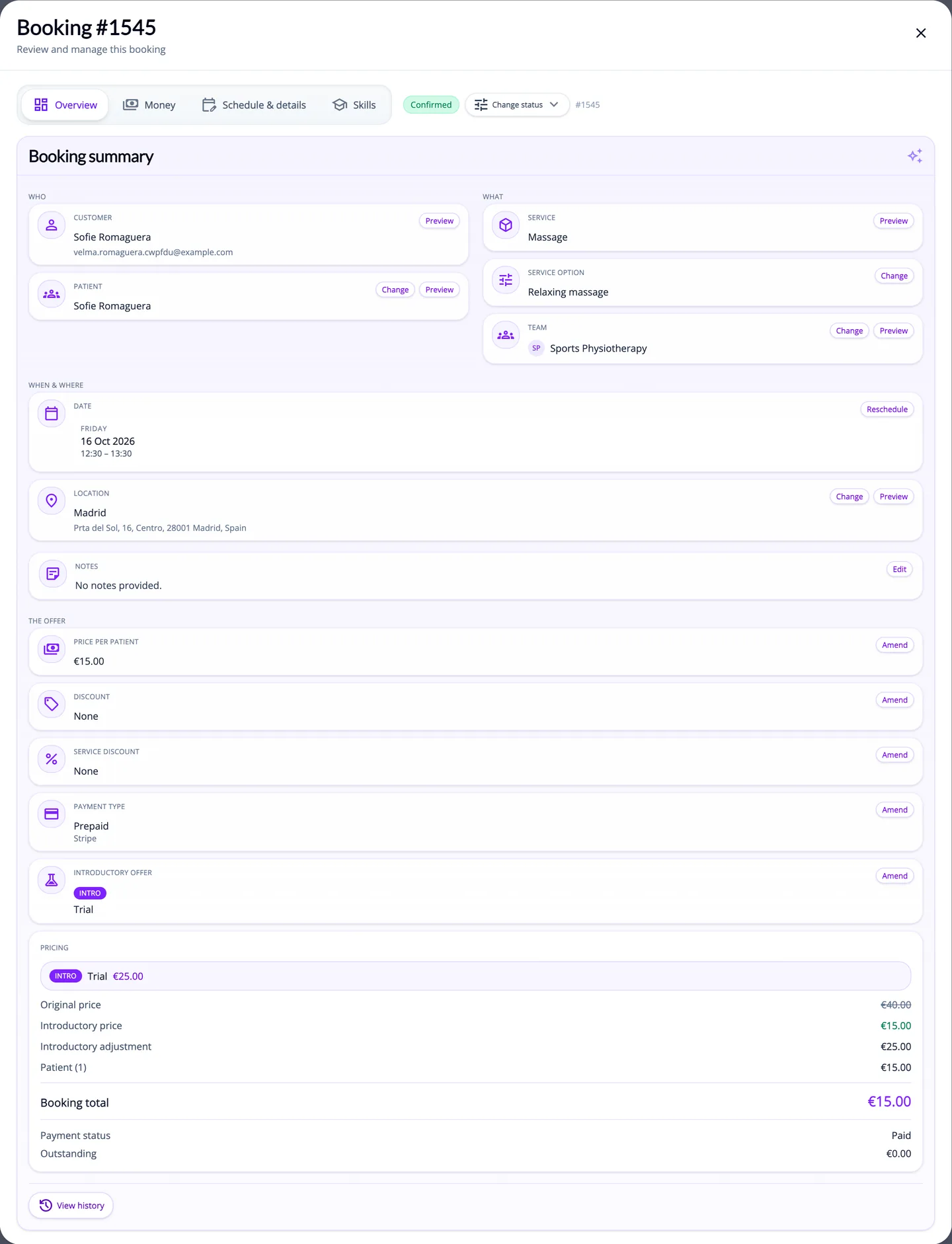
A booking's details in the ServEase admin
Product illustration

One booking, one record

  1. Customer books

    The widget or Customer Portal offers times that fit your schedules, teams, resources and existing bookings.

  2. Booking is acknowledged

    The customer receives an email acknowledging the booking. Depending on your settings, it is confirmed straight away, once it is paid, or after your team approves it.

  3. Team is informed

    The booking appears in the assigned team's workspace. In-app notifications and schedule digests follow your settings, and a one-way export updates connected calendars where you have set one up.

  4. Payment is tracked

    Online payments through your provider and payments you record yourself sit in the same ledger, and your reports include them.

A booking is acknowledged when it is made and confirmed when it meets your confirmation rules. With an accounting connection (Growth), the selected provider can create supported documents on the triggers you enable.

Sell and book

Bookings

Online booking that respects your real availability

Customers book through widgets on your website or in the Customer Portal. ServEase offers times that fit your schedules, team and resource hours, locations and existing bookings, and checks the time again when the booking is submitted.

  • Calendar, timetable and list widgets for your website, plus a map widget for services at physical or on-site locations. Customers sign up, or sign in with a password or an email link, as they book.
  • Availability takes account of schedules, team and resource hours, time off, buffers, capacity and existing bookings.
  • Group classes with seat limits, and multi-session courses booked as one linked series.
  • Bookings are assigned to a team, not to an automatically chosen individual. Admins and permitted staff can create, reschedule, reassign or extend bookings, and block time with off-system reservations.
  • Bookings can be confirmed automatically. Where enabled, admins or authorised team leaders approve paid bookings first. Customers can cancel within your cut-off and refund rules.

Example: A swim school sells an eight-place beginner course. Parents book the whole course in the widget, and it shows as full once the eighth place is taken.

Resources

Book the people and the things a service depends on

A service can need a team, a resource such as a vehicle, accommodation or a room, or both. Each resource has its own hours and time off.

  • Services delivered by a team, by a resource, or by both, where both must be free at the same time.
  • Resource categories with their own hours and time off, plus cleaning or turnaround time where you set it.
  • Rentals and stays priced by the hour, day or night, with extra-driver or guest fees where you configure them.
  • Vehicle rentals can require a driving-licence category and a minimum driver age. An admin can override this, with the reason recorded.
  • On-site services can use a coverage radius, a travel-time limit and a travel surcharge where you configure them.

Example: A rental desk lists a small car by the day. The customer picks dates in the widget and adds a second driver, and the car is blocked for those days.

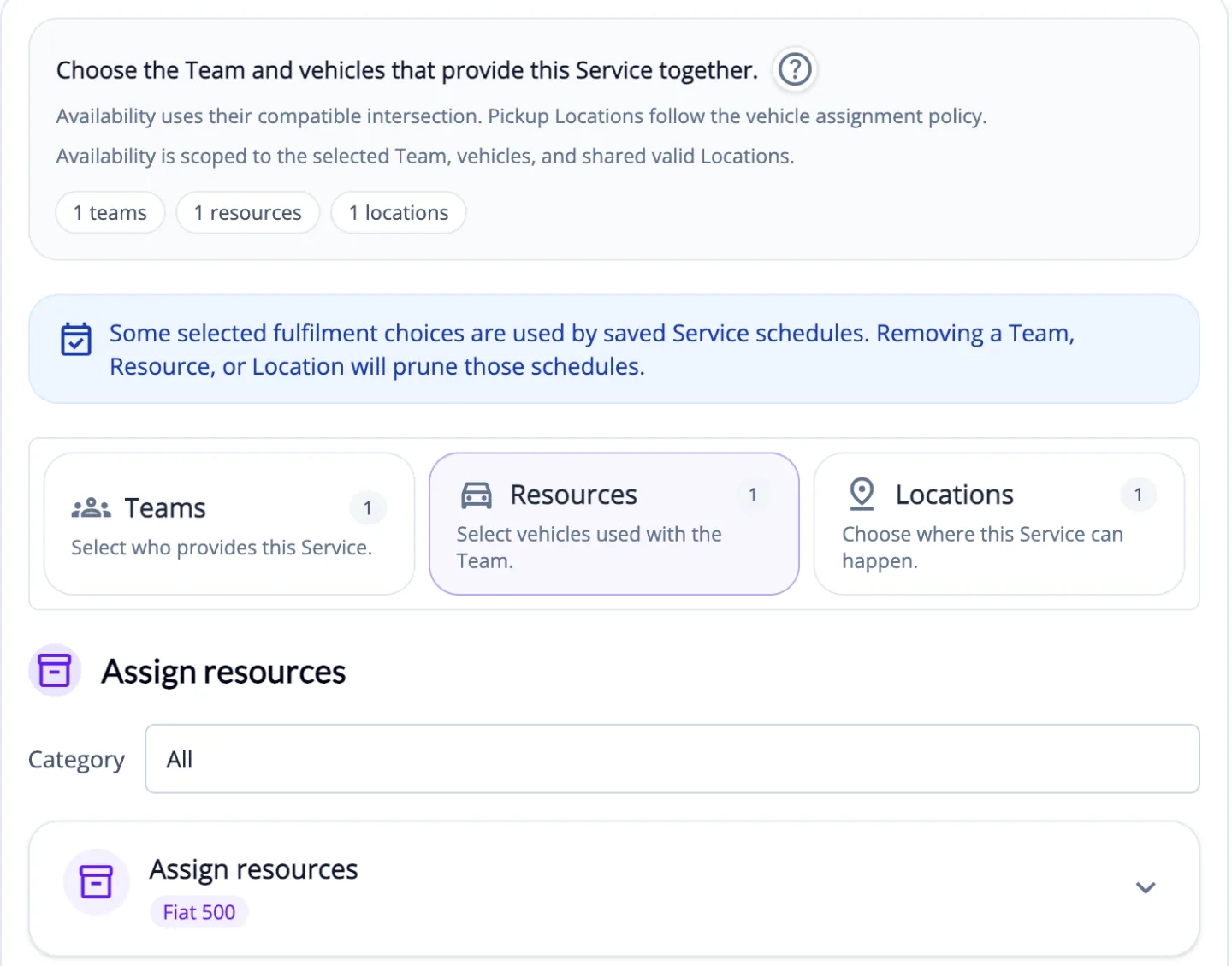
ServEase service setup assigning one team and one vehicle that provide the service together
Product illustrationService setup: the team and the vehicle that deliver a service together.

Services & pricing

Price each service the way you sell it

The Service Wizard sets options, durations, buffers, schedules, payment terms and visibility. Growth adds advanced pricing and promotions.

  • Options with their own duration and price, preparation and cool-down time, and multi-session packages.
  • Prepaid, postpaid or recurring billing terms per service. Discount codes can carry usage, expiry and first-booking limits.
  • Rental and stay services can show your own deposit instructions to customers. ServEase does not collect or hold deposits.
  • GrowthTiered pricing based on the quantity a customer chooses. Quotation pricing lets your team price the request; the customer then accepts the quote in the Customer Portal.
  • GrowthIntroductory offers and configured promotions for eligible customers, such as special discounts and multi-booking tiers, plus Service Vouchers that cover one eligible booking. Vouchers are never money or stored credit.

Example: A language school can set a 20% student discount, offer eligible new customers a free first lesson as an introductory offer, and send quotes for bespoke company courses.

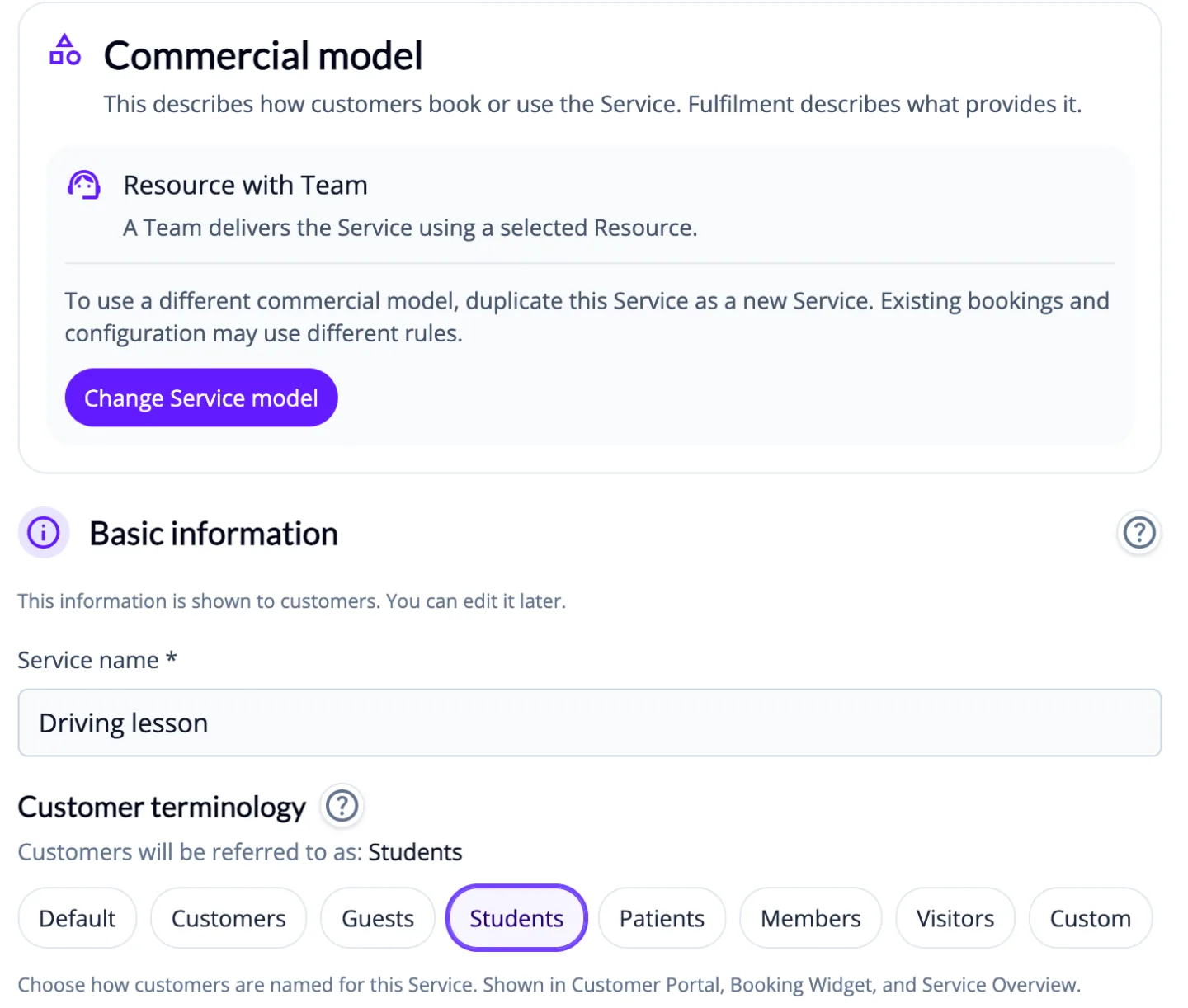
ServEase Service Wizard with the Resource with Team commercial model and customer terminology options
Product illustrationService Wizard: how the service is sold and what your customers are called.
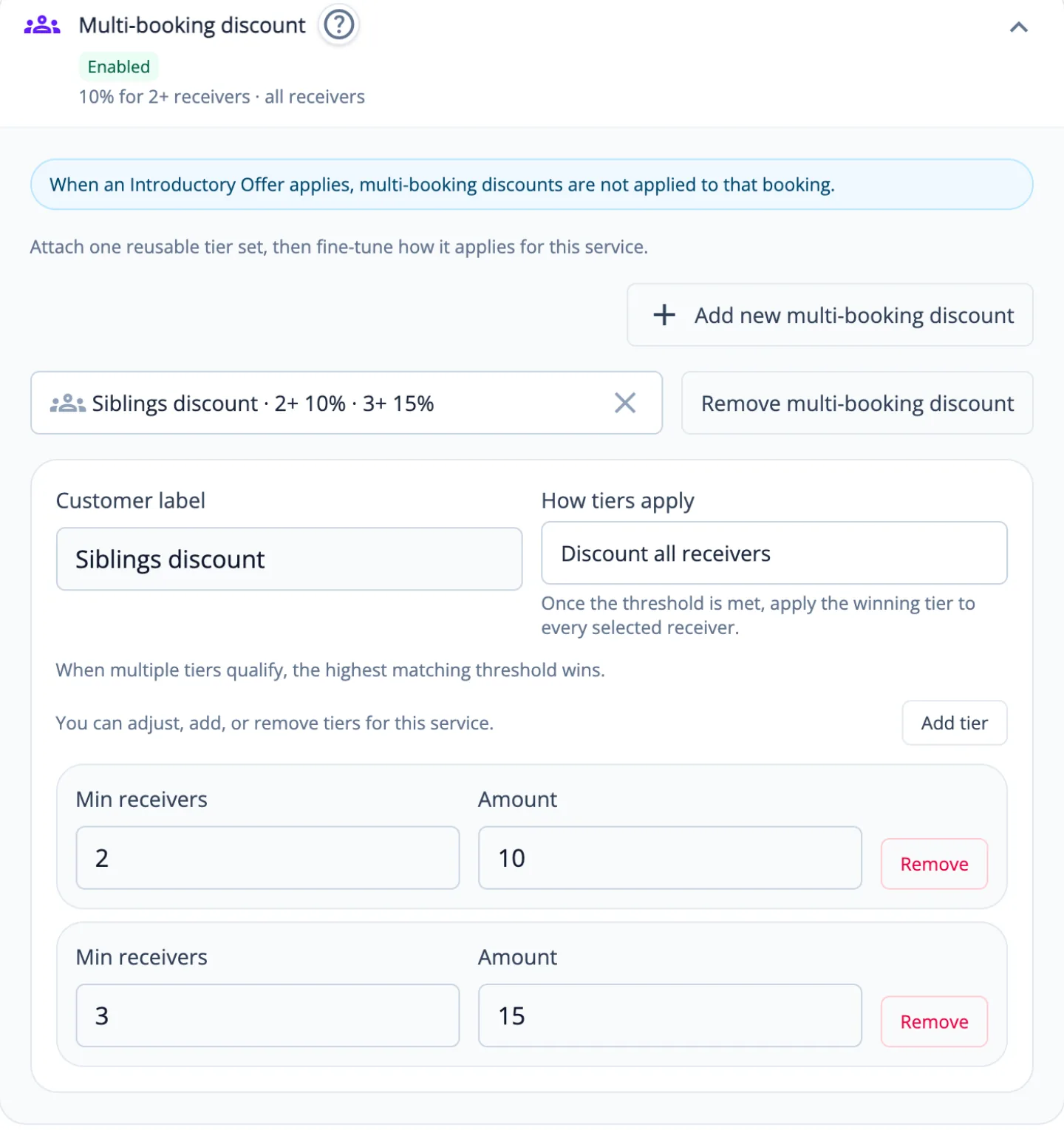
Multi-booking discount settings with 10% off for two people and 15% off for three on one booking
Product illustrationGrowth: multi-booking discount tiers in the Service Wizard.

Serve your customers

Customers

A place for customers to book, pay and manage their bookings

Your team works from each customer's profile. Customers can access their bookings and payments through the Customer Portal once they have an account, which they get by invitation, by signing up, or with an email sign-in link.

  • Customer profiles with bookings, transactions, balances and lifetime spend.
  • Record who or what a booking is for: a person, such as a child or a patient, or a car. In Settings you can rename labels such as "People on a booking" to suit your business.
  • In the Customer Portal, signed-in customers can view and cancel eligible bookings within your rules, rebook, see their transactions and manage their people and vehicles. They can also pay outstanding amounts when online payments are set up.
  • GrowthQuestionnaires around a booking, with the answers kept on the customer profile.
  • Widget colours, fonts and logo on every plan. Portal, widget and emails are available in eight languages. GrowthCustomer Portal theme and email branding.

Example: A parent books lessons for two children, pays the outstanding balance from their phone, and rebooks next term from last term's booking.

Related solutions: Appointments

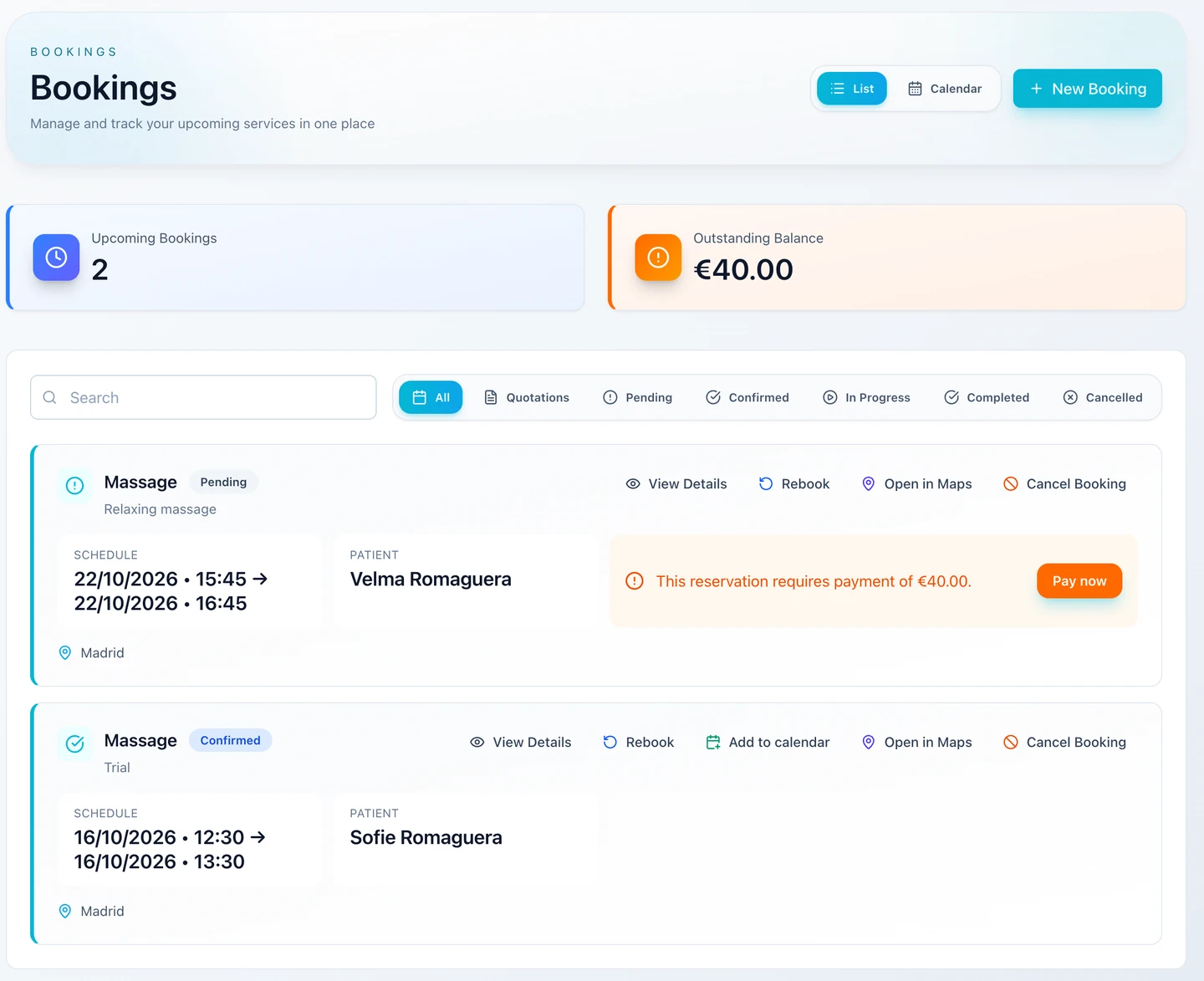
Booking actions available to a customer in the Customer Portal
Product illustrationCustomer Portal: the actions a customer can take on a booking.

Payments

Online payments and recorded payments in one ledger

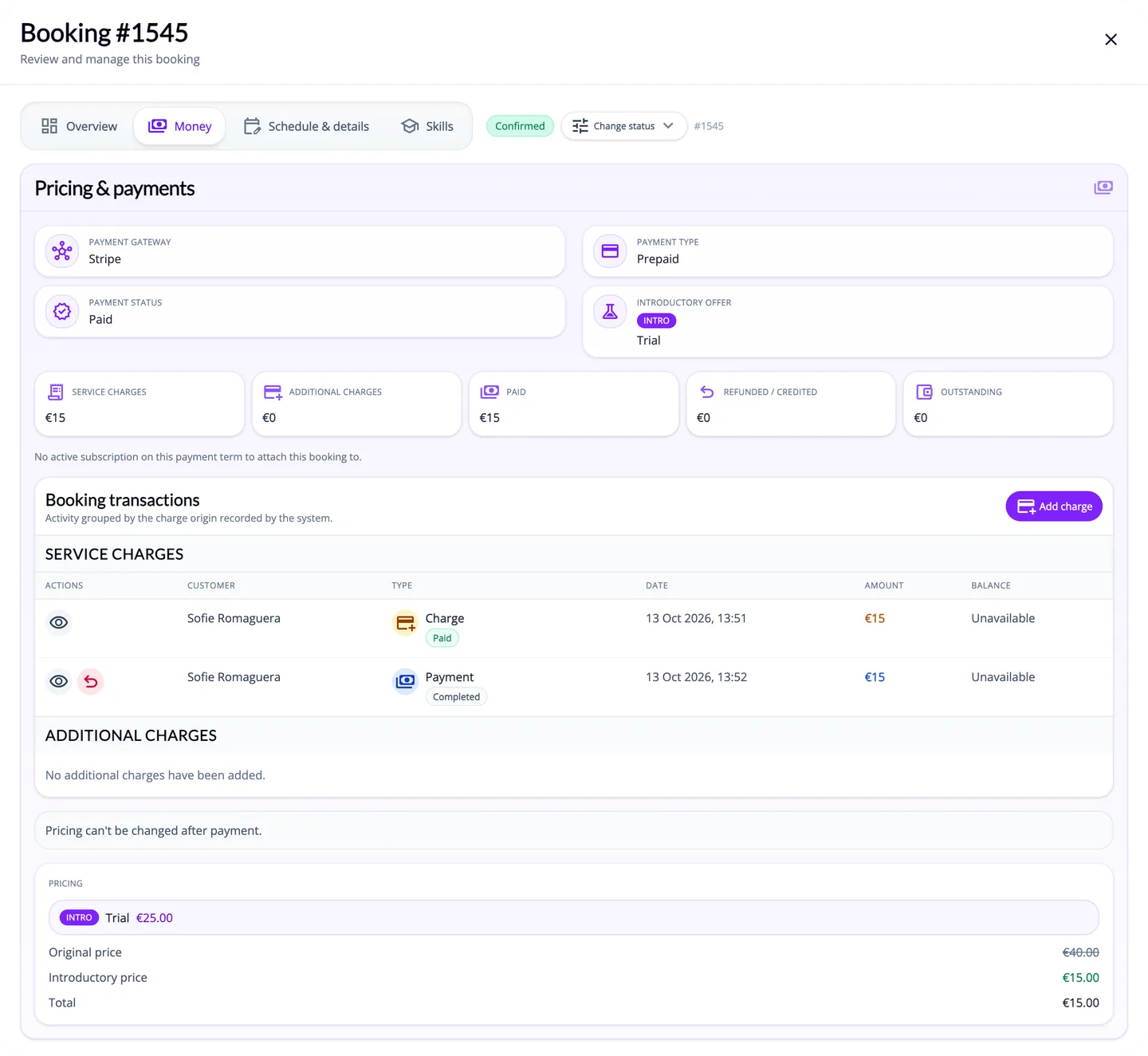
Choose a supported payment provider, record payments you take outside ServEase, and track charges, payments, refunds and outstanding balances in one place.

  • Choose a supported provider for online checkout: Stripe, PayPal, Przelewy24, Tpay or eService. Refunds depend on the configured provider and the payment's state.
  • Record cash, bank-transfer and cheque payments you collect yourself. ServEase records them but does not process them. When an online provider is connected, you can send secure payment links for amounts due.
  • Add extra charges, record full or partial refunds, set a refund policy per service, and give customers credit. Available credit is applied to new charges in the same currency.
  • Recurring billing terms raise charges weekly, fortnightly or monthly, which the customer pays by link or from credit. There is no automatic card debit. Pay-after-service bookings can send payment-link reminders.
  • GrowthYour connected Fakturownia or QuickBooks account can create supported accounting documents on the triggers you enable, for example an invoice when a payment is completed. QuickBooks setup is assisted by our support team.

Example: A cleaning company bills after each visit. When the job is marked complete, ServEase raises the charge and sends payment-link reminders until it is paid.

Charges, payments and outstanding amount on a booking in the ServEase admin
Product illustrationAdmin view of a booking's charges, payments and outstanding amount.
Julia Kaleńska-Rodzaj, owner of KODA
In 2026, KODA — Krakowski Ośrodek dla Artystów — celebrated its 15th anniversary. We were looking for a solution that would help us better organise the work of specialists supporting stage fright, stage performance, therapy, and workshops. ServEase.io turned out to be exactly what we needed. Automated bookings and schedule management let us plan the work of the whole team weeks ahead in just a few moments. The system not only brought order to the way we work, but also opened up new possibilities for promoting services and analysing client data. The platform's international reach was a huge advantage too — our clients abroad, including in the USA, could use KODA's services without any problems. ServEase.io let us focus on what matters most: working with people and developing our centre.

Julia Kaleńska-Rodzaj

Owner, KODA — Krakowski Ośrodek dla Artystów

Team schedules planned weeks ahead

Stronger service promotion

International clients served smoothly

Run the business

Team

Team members see their team's work

Organise staff into departments and teams. Employees who belong to a team work from the Employee Portal.

  • Departments and teams with team leaders, locations, weekly hours, and time off recorded by admins.
  • Fixed roles control what each person can open: Admin, Team Leader, Team Member and Employee.
  • In the Employee Portal, team members see their teams' bookings, calendar, related customers and notifications. Eligible staff can create, reschedule and cancel bookings for the teams they belong to.
  • Where paid-booking approval is enabled, the team's leader or an admin approves those bookings.
  • In-app notifications for booking changes, scheduled daily, weekly and change-summary emails, and optional one-way personal calendar export.

Example: On Monday morning a team leader opens the Employee Portal, reviews the team's new bookings and approves the paid ones waiting for confirmation.

Reports

See what is booked, paid and outstanding

A dashboard and three summary reports on every plan. Growth adds the detailed report library.

  • A dashboard for the last 30 days: bookings, charges, payments, refunds, outstanding balance, customer growth, net cash flow and top services.
  • Bookings, Transactions and Customers summaries with daily trends.
  • GrowthDetailed reports by service, team and receiver, plus transaction totals, payments, refunds, outstanding balances, non-gateway payments and customer credits.
  • Export data from supported reports, with per-currency breakdowns where available.

Example: At month end the owner exports outstanding balances and checks cash and bank-transfer payments in the Non-Gateway Payments report.

Notifications

Keep customers and staff informed

Customers, staff and admins receive booking emails and in-app notifications at the steps that matter.

  • Customer emails when a booking is created, confirmed, rescheduled, cancelled or completed. The first email acknowledges the booking and says whether payment or approval is still needed.
  • Reminders 24 hours and 1 hour before the booking, plus payment-link, payment-reminder and quote-ready emails where they apply.
  • Customise supported email templates and preview them in the available languages. GrowthAdd your logo and colours.
  • In-app notifications for admins, staff and customers.

Example: A customer books on Sunday evening. They receive an email acknowledging the booking, then a confirmation once it is paid or approved, and reminders the day before and an hour before.

Integrations

Connect the tools you already use

Calendar export on every plan, accounting on Growth, and an API with webhooks on Scale.

  • One-way calendar export: bookings and time off are sent to Google Calendar or Outlook / Microsoft 365 where connected, or published as a private feed you can subscribe to in Apple Calendar. Events in those calendars do not block availability in ServEase.
  • Payment providers and accounting connections, as described under Payments.
  • ScaleAPI keys and an integration API for bookings, customers and services.
  • ScaleSigned webhooks for supported booking, customer and payment events, with delivery history.

Example: A business on Scale sends each new booking to its own CRM through a configured webhook.

Plans

Every plan includes bookings and availability, Bookable Resources, widgets and the Customer Portal, payments, discount codes, calendar export, the dashboard and Basic reports. Growth adds promotions, advanced pricing, Service Vouchers, questionnaires, accounting connections, advanced reporting and branding. Scale adds the API, webhooks and priority support.

Compare plans

Getting started

Try it free for 14 days

Sign up yourself. No card is required during the trial.

Guided setup

A setup wizard and checklist help you set your language and region, who your bookings are for, and your payment settings.

Ready for your customers

Eight languages, five currencies (PLN, EUR, USD, GBP, CZK), and an installable web app for admins, staff and customers.

Start running your business the easy way

Bookings, teams, resources, payments and customers in one system. Try it free for 14 days.

Start free trial
14-day free trialNo card requiredGuided setup

Built and used in real-world service businesses